nuScenes
The nuScenes dataset is multi-modal autonomous driving dataset that includes data from cameras, Lidars, and radars, along with detailed annotations from Boston and Singapore. In total, the dataset contains 1000 driving logs, each of 20 second duration, resulting in 5.5 hours of data. All logs include ego-vehicle data, camera images, Lidar point clouds, bounding boxes, and map data.
Overview
Papers |
|
Download |
|
Code |
|
License |
Apache License 2.0 |
Available splits |
|
Interpolated splits (10 Hz) |
|
Sensor Overview
The following timeplot illustrates the temporal alignment and recording frequency of the available sensors:
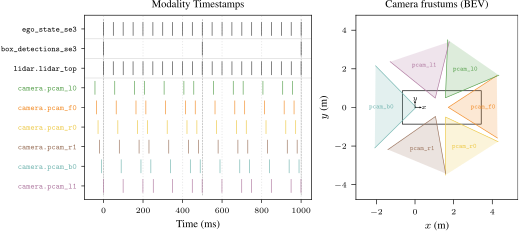
Sensor recording timeline.
Available Modalities
Name |
Available |
Description |
|---|---|---|
Ego Vehicle |
✓ |
State of the ego vehicle, including poses, dynamic state, and vehicle parameters, see |
Map |
(✓) |
The HD-Maps are in 2D vector format and defined per-location. For more information, see |
Bounding Boxes |
✓ |
The bounding boxes are available with the |
Traffic Lights |
X |
|
Cameras |
✓ |
nuScenes includes 6x |
Lidars |
✓ |
Dataset Specific
- class py123d.parser.registry.NuScenesBoxDetectionLabel[source]
Semantic labels for nuScenes bounding box detections. [1] https://github.com/nutonomy/nuscenes-devkit/blob/master/docs/instructions_nuscenes.md#labels
- VEHICLE_CAR = 0
- VEHICLE_TRUCK = 1
- VEHICLE_BUS_BENDY = 2
- VEHICLE_BUS_RIGID = 3
- VEHICLE_CONSTRUCTION = 4
- VEHICLE_EMERGENCY_AMBULANCE = 5
- VEHICLE_EMERGENCY_POLICE = 6
- VEHICLE_TRAILER = 7
- VEHICLE_BICYCLE = 8
- VEHICLE_MOTORCYCLE = 9
- HUMAN_PEDESTRIAN_ADULT = 10
- HUMAN_PEDESTRIAN_CHILD = 11
- HUMAN_PEDESTRIAN_CONSTRUCTION_WORKER = 12
- HUMAN_PEDESTRIAN_PERSONAL_MOBILITY = 13
- HUMAN_PEDESTRIAN_POLICE_OFFICER = 14
- HUMAN_PEDESTRIAN_STROLLER = 15
- HUMAN_PEDESTRIAN_WHEELCHAIR = 16
- MOVABLE_OBJECT_TRAFFICCONE = 17
- MOVABLE_OBJECT_BARRIER = 18
- MOVABLE_OBJECT_PUSHABLE_PULLABLE = 19
- MOVABLE_OBJECT_DEBRIS = 20
- STATIC_OBJECT_BICYCLE_RACK = 21
- ANIMAL = 22
- to_default()[source]
Inherited, see superclass.
Download
You need to register at nuScenes and accept the CC BY-NC-SA 4.0 dataset terms before any download succeeds.
py123d ships an automated downloader that wraps the nuScenes AWS Cognito auth flow and per-archive CloudFront API — so you don’t need to click through the download page manually.
Requires $NUSCENES_EMAIL and $NUSCENES_PASSWORD to be set.
export NUSCENES_EMAIL=...
export NUSCENES_PASSWORD=...

# Minimal smoketest (~600 MB): mini split + HD maps + CAN bus
py123d-download dataset=nuscenes downloader.preset=mini

# Smallest useful trainval slice (~75 GB): trainval metadata + first blob + maps + CAN bus
py123d-download dataset=nuscenes downloader.preset=trainval_one

# Full dataset (~700 GB): every archive in the catalog
py123d-download dataset=nuscenes downloader.preset=full

# Or a custom archive list:
py123d-download dataset=nuscenes \
    'downloader.archives=[v1.0-trainval_meta.tgz, v1.0-trainval03_blobs.tgz, nuScenes-map-expansion-v1.3.zip, can_bus.zip]'
The archives are downloaded into a session-scoped temp directory, extracted into
$NUSCENES_DATA_ROOT, and deleted — only the standard nuScenes tree survives.
Downloader attribution
The nuScenes Cognito USER_PASSWORD_AUTH flow, the API gateway path, and the
13-entry MD5 checksum catalog for the core trainval/test archives used in
NuscenesDownloader are adapted
from the MIT-licensed community project
li-xl/nuscenes-download
(Copyright (c) 2025 Xiang-Li Li).
Alternative: manual download. If you prefer to click through the official download page, you need the same parts:
CAN bus expansion pack —
can_bus.zipMap expansion pack (v1.3) —
nuScenes-map-expansion-v1.3.zipFull dataset (v1.0)
Mini dataset (
v1.0-mini.tgz) (for quick testing)Train/Val split (
v1.0-trainval_meta.tgz+v1.0-trainval{01..10}_blobs.tgz)Test split (
v1.0-test_meta.tgz+v1.0-test_blobs.tgz)
The 123D conversion expects the following directory structure:
$NUSCENES_DATA_ROOT
  ├── can_bus/
  │   ├── scene-0001_meta.json
  │   ├── ...
  │   └── scene-1110_zoe_veh_info.json
  ├── maps/
  │   ├── 36092f0b03a857c6a3403e25b4b7aab3.png
  │   ├── ...
  │   ├── 93406b464a165eaba6d9de76ca09f5da.png
  │   ├── basemap/
  │   │   └── ...
  │   ├── expansion/
  │   │   └── ...
  │   └── prediction/
  │       └── ...
  ├── samples/
  │   ├── CAM_BACK/
  │   │   └── ...
  │   ├── ...
  │   └── RADAR_FRONT_RIGHT/
  │       └── ...
  ├── sweeps/
  │   └── ...
  ├── v1.0-mini/
  │   ├── attribute.json
  │   ├── ...
  │   └── visibility.json
  ├── v1.0-test/
  │   ├── attribute.json
  │   ├── ...
  │   └── visibility.json
  └── v1.0-trainval/
      ├── attribute.json
      ├── ...
      └── visibility.json
Lastly, you need to add the following environment variables to your ~/.bashrc according to your installation paths:
export NUSCENES_DATA_ROOT=/path/to/nuplan/data/root
Or configure the config py123d/script/config/common/default_dataset_paths.yaml accordingly.
Installation
For nuScenes, additional installation that are included as optional dependencies in py123d are required. You can install them via:
pip install py123d[nuscenes]
pip install -e .[nuscenes]
Conversion
Local mode — data already extracted to $NUSCENES_DATA_ROOT (see the Download
section above):
py123d-conversion datasets=["nuscenes"]
# or
py123d-conversion datasets=["nuscenes-mini"]
Note
The conversion of nuScenes by default does not store sensor data in the logs, but only relative file paths.
To change this behavior, you need to adapt the nuscenes-sensor.yaml or nuscenes-mini.yaml converter configuration.
Streaming mode — materialize a chosen archive subset from nuScenes’ CloudFront
API into a session-scoped temp directory at parser construction time, convert from
it, and delete the temp directory on parser destruction. The maps/ subdirectory
extracted from the map expansion is auto-detected (no nuscenes_map_root override
needed).
export NUSCENES_EMAIL=...
export NUSCENES_PASSWORD=...

# Smoketest (~600 MB download): mini dataset + HD maps + CAN bus.
py123d-conversion dataset=nuscenes-mini-stream

# Smallest useful trainval slice (~75 GB download):
py123d-conversion dataset=nuscenes-stream
py123d-conversion dataset=nuscenes-stream 'dataset.parser.splits=[nuscenes_val]'

# Specific archive selection (skip auto-preset):
py123d-conversion dataset=nuscenes-stream \
    'dataset.parser.stream_archives=[v1.0-trainval_meta.tgz, v1.0-trainval03_blobs.tgz, nuScenes-map-expansion-v1.3.zip, can_bus.zip]'
Warning
Streaming downloads can be large even for a “small” slice — the smallest trainval
preset is ~75 GB on the wire. Use dataset=nuscenes-mini-stream (~600 MB) when
smoke-testing the pipeline.
Note
Streaming mode forces camera_store_option: "jpeg_binary" and
lidar_store_option: "binary" — the temp directory is deleted immediately after
the parser is garbage-collected, so any "path" references would point at
vanished sources.
Interpolated Conversion (10 Hz)
The standard nuScenes dataset provides keyframe annotations at 2 Hz (every 0.5 s). The interpolated converter upsamples this to 10 Hz by leveraging the intermediate sensor sweeps that nuScenes records between keyframes. You can convert the interpolated variant by running:
py123d-conversion datasets=["nuscenes-interpolated"]
# or
py123d-conversion datasets=["nuscenes-interpolated-mini"]
The interpolated conversion uses the NuScenesInterpolatedConverter.
Interpolation Details
Frame selection.
The nuScenes LIDAR_TOP sensor records sweeps at approximately 20 Hz.
The converter collects all lidar sample_data records (keyframes and non-keyframe sweeps) for a scene,
then selects a subset at approximately 10 Hz by placing regular target timestamps between each pair of
2 Hz keyframes and picking the closest lidar sweep for each target.
All original keyframes are always included.
Ego pose.
Every lidar sweep (including non-keyframe sweeps) has its own ego_pose record in nuScenes.
The converter uses these real ego poses rather than interpolating between keyframes.
Dynamic state (velocity, acceleration, angular velocity) is obtained from the CAN bus by matching
the closest CAN bus message to the sweep timestamp.
Bounding box interpolation. Bounding box annotations only exist at 2 Hz keyframes. For intermediate frames the converter interpolates between the surrounding keyframe annotations:
Detections are matched across consecutive keyframes by their
instance_token(track ID).Position (x, y, z): linear interpolation.
Rotation (quaternion): spherical linear interpolation (SLERP) via
pyquaternion.Dimensions (length, width, height): linear interpolation.
Velocity: linear interpolation.
Detections that only appear in one of the two surrounding keyframes (track starts/ends) are excluded at interpolated frames and only written at their actual keyframe.
num_lidar_pointsis set to0for interpolated frames.
Lidar.
Each selected 10 Hz frame uses the actual lidar point cloud file from the corresponding
sample_data sweep, so no point cloud interpolation is performed.
Cameras.
At keyframes, cameras are extracted as in the standard converter (using the sample["data"] references).
In nuScenes, these references point to the camera image captured just before the lidar sweep completes,
aligning the camera observation to the end of the lidar sweep.
At non-keyframe timestamps the converter follows the same convention: for each camera channel it selects the
most recent sample_data record whose timestamp is at or before the lidar sweep timestamp,
within a 100 ms tolerance (one full ~12 Hz camera period), consistent with the keyframe extraction.
Note
The interpolated converter requires the same nuScenes data as the standard converter,
including the sweeps/ directory which contains the non-keyframe sensor data.
Dataset Issues
Map: The HD-Maps are only available in 2D.
…
Citation
If you use nuScenes in your research, please cite:
@article{Caesar2020CVPR,
  title={nuscenes: A multimodal dataset for autonomous driving},
  author={Caesar, Holger and Bankiti, Varun and Lang, Alex H and Vora, Sourabh and Liong, Venice Erin and Xu, Qiang and Krishnan, Anush and Pan, Yu and Baldan, Giancarlo and Beijbom, Oscar},
  booktitle={Proceedings of the IEEE/CVF conference on computer vision and pattern recognition},
  year={2020}
}