NCore (PhysicalAI-AV NCore)
Warning
Experimental Dataset Support
The NCore dataset integration is currently under active development and should be considered experimental. Features may be incomplete, APIs may change, and unexpected bugs are possible.
If you encounter any issues, please report them on our GitHub Issues page. Your feedback helps us improve!
NCore is NVIDIA’s PhysicalAI-Autonomous-Vehicles-NCore dataset. It ships on the same
NVIDIA Hyperion 8.1 sensor platform as the Physical AI AV dataset — 7 f-theta (fisheye)
cameras at ~30 fps, a 360° top LiDAR at ~10 Hz, auto-labeled 3D cuboid detections, and
rig-to-world egomotion poses — but in the newer NCore V4 component-based format
(indexed-tar zarr archives, .zarr.itar) rather than raw parquet/mp4 files.
Overview
Download |
Hugging Face (gated) |
Code |
|
License |
Please refer to the dataset’s official license terms. |
Available splits |
|
Sensor Overview
The following timeplot illustrates the temporal alignment and recording frequency of the available sensors:
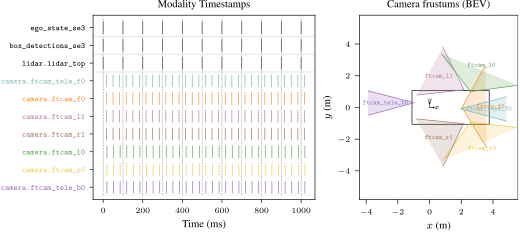
Sensor recording timeline.
Available Modalities
Name |
Available |
Description |
|---|---|---|
Ego Vehicle |
✓ |
Rig-to-world poses sampled at ~100 Hz. NCore stores poses only (no velocity or acceleration); py123d’s |
Map |
X |
Not available for this dataset. |
Bounding Boxes |
✓ |
Auto-labeled 3D cuboid track observations with the same 10-class taxonomy as Physical AI AV ( |
Traffic Lights |
X |
Not available for this dataset. |
Cameras |
✓ |
Same 7 f-theta (fisheye) cameras as Physical AI AV, see |
Lidars |
✓ |
1 top-mounted 360° LiDAR, see |
Download
The dataset is gated on Hugging Face. You need (1) a HF account that has accepted the
NVIDIA AV dataset license and (2) an HF token exported as HF_TOKEN (or set via
dataset.downloader.hf_token). Downloads run through the unified
py123d-download CLI:
pip install py123d[ncore]          # pulls in huggingface_hub and nvidia-ncore
export HF_TOKEN=hf_...

# Download a 5-clip random subset (~12 GB) to $NCORE_DATA_ROOT
py123d-download dataset=ncore \
    dataset.downloader.num_clips=5 \
    dataset.downloader.sample_random=true

# Or the full dataset (~2.4 TB)
py123d-download dataset=ncore

# Or just one modality + a subset
py123d-download dataset=ncore \
    dataset.downloader.num_clips=20 \
    dataset.downloader.modality=lidar

py123d-download dataset=ncore \
    dataset.downloader.num_clips=20 \
    dataset.downloader.modality=cameras \
    'dataset.downloader.cameras=[camera_front_wide_120fov]'
The downloaded dataset has the following per-clip structure:
$NCORE_DATA_ROOT
└── clips/
    └── {clip_id}/
        ├── pai_{clip_id}.json                                    (sequence manifest)
        ├── pai_{clip_id}.ncore4.zarr.itar                        (poses, intrinsics, cuboids, masks)
        ├── pai_{clip_id}.ncore4-lidar_top_360fov.zarr.itar       (~1.0 GB)
        └── pai_{clip_id}.ncore4-camera_{name}.zarr.itar          (~150 MB x 7 cameras)
Installation
Install the ncore extra to pull in the NCore reader plus the HF downloader:
pip install py123d[ncore]
Conversion
Local mode — clips already downloaded to $NCORE_DATA_ROOT (see the Download section above):
export NCORE_DATA_ROOT=/path/to/ncore
py123d-conversion dataset=ncore

# Limit to a few clips during development:
py123d-conversion dataset=ncore dataset.parser.max_clips=2
Streaming mode — dataset=ncore-stream attaches an NCoreDownloader to each
log parser. Each Ray worker downloads its assigned clip to a per-clip temp directory,
runs the conversion, and deletes the temp directory before moving on. Useful when disk
is tight or you want to convert a one-off subset without committing ~2.4 TB to permanent
storage:
# Authenticate once — NCore is a gated HF dataset
export HF_TOKEN=hf_...

# Stream the first 5 clips end-to-end:
py123d-conversion dataset=ncore-stream \
    dataset.parser.max_clips=5

# Stream specific clip UUIDs:
py123d-conversion dataset=ncore-stream \
    'dataset.parser.downloader.clip_ids=[000da9de-0ee5-465a-9a2d-e7e91d3016bb]'

# Stream only one modality to cut per-clip traffic:
py123d-conversion dataset=ncore-stream \
    dataset.parser.max_clips=5 \
    dataset.parser.downloader.modality=lidar
Clip-level parallelism therefore also parallelizes downloads.
Warning
Each NCore clip is ~1.2 GB (1 x LiDAR archive + 7 x camera archives). Even small
values of max_clips imply multi-GB of download traffic.
Note
The default conversion stores camera frames as JPEG-binary Arrow columns (NCore
already stores JPEG in each frame, so no re-encoding happens) and LiDAR as
Draco. Override via the ncore.yaml converter config if needed.
To pre-stage data outside the conversion pipeline (e.g. when you want a persistent
local copy shared across multiple conversion runs), use py123d-download — see the
Download section above for invocations.
Dataset Issues
Auto-labeled detections: Cuboids are auto-generated, so they can be noisier than human-annotated ground truth.
No ego dynamics in source: NCore carries rig-to-world poses only. Velocity/acceleration are reconstructed by py123d via finite differences when
infer_ego_dynamicsis enabled (the default).FTheta 6-coefficient polynomials: NCore’s FTheta camera model uses 6 polynomial coefficients. py123d’s
FThetaIntrinsicshas been extended to carry 6 coefficients; the Physical AI AV parser pads its native 5-coefficient polynomial with a trailing zero.Anisotropic linear_cde absorbed into polynomials: NCore’s FTheta adds a sensor→image affine term
linear_cde = [c, d, e]that py123d’s isotropic FTheta model does not carry. For the typical Hyperion 8 case (d = e = 0,cwithin a few percent of 1) the conversion absorbscinto the polynomials as a geometric-mean (sqrt(c)) approximation and logs a warning. Non-trivial shear (dorefar from zero) raises — silent acceptance would misproject.No HD map: This dataset does not include map information.
Citation
n/a