Physical AI AV
Warning
Experimental Dataset Support
The Physical AI AV dataset integration is currently under active development and should be considered experimental. Features may be incomplete, APIs may change, and unexpected bugs are possible.
If you encounter any issues, please report them on our GitHub Issues page. Your feedback helps us improve!
The Physical AI AV dataset provides autonomous driving sensor data collected using the NVIDIA Hyperion 8 platform. It includes 7 f-theta (fisheye) cameras at ~30 fps, a 360-degree LiDAR at ~10 Hz, auto-labeled 3D bounding box detections, and high-rate egomotion data (67-100 Hz). The dataset features Draco-compressed LiDAR point clouds with per-point timestamps and dual egomotion sources (real-time and offline-smoothed).
Overview
Download |
|
Code |
|
License |
Please refer to the dataset’s official license terms. |
Available splits |
|
Sensor Overview
The following timeplot illustrates the temporal alignment and recording frequency of the available sensors:
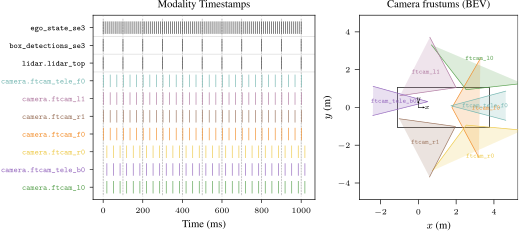
Sensor recording timeline.
Available Modalities
Name |
Available |
Description |
|---|---|---|
Ego Vehicle |
✓ |
State of the ego vehicle including poses, velocity, and acceleration at 67-100 Hz. Two egomotion sources are available: real-time and offline-smoothed. See |
Map |
X |
Not available for this dataset. |
Bounding Boxes |
✓ |
Auto-labeled 3D bounding box detections with 10 semantic classes and track tokens. See |
Traffic Lights |
X |
Not available for this dataset. |
Cameras |
✓ |
Includes 7 f-theta (fisheye) cameras at ~30 fps, see
|
Lidars |
✓ |
Includes 1 top-mounted 360-degree LiDAR, see
|
Dataset Specific
- class py123d.parser.registry.PhysicalAIAVBoxDetectionLabel[source]
Semantic labels for Physical AI AV dataset obstacle detections (auto-labeled).
Matches the 12 dynamic object classes documented in the NVlabs physical_ai_av wiki: https://github.com/NVlabs/physical_ai_av/wiki/5.-Machine-Labels-(Coming-Soon)
- AUTOMOBILE = 0
- PERSON = 1
- BUS = 2
- HEAVY_TRUCK = 3
- OTHER_VEHICLE = 4
- PROTRUDING_OBJECT = 5
- RIDER = 6
- STROLLER = 7
- TRAILER = 8
- ANIMAL = 9
- TRAIN_OR_TRAM_CAR = 10
- TROLLEY_BUS = 11
- to_default()[source]
Inherited, see superclass.
- Return type:
DefaultBoxDetectionLabel
Download
The dataset can be downloaded from Hugging Face. For additional tools and documentation, see the Physical AI AV devkit.
The downloaded dataset should have the following structure:
$PHYSICAL_AI_AV_DATA_ROOT
├── clip_index.parquet
├── calibration/
│   ├── camera_intrinsics/
│   │   └── camera_intrinsics.chunk_XXXX.parquet
│   └── sensor_extrinsics/
│       └── sensor_extrinsics.chunk_XXXX.parquet
├── labels/
│   ├── egomotion/
│   │   └── {clip_id}.egomotion.parquet
│   ├── egomotion.offline/
│   │   └── {clip_id}.egomotion.offline.parquet
│   └── obstacle.offline/
│       └── {clip_id}.obstacle.offline.parquet
├── lidar/
│   └── lidar_top_360fov/
│       └── {clip_id}.lidar_top_360fov.parquet
└── camera/
    ├── camera_front_wide_120fov/
    ├── camera_front_tele_30fov/
    ├── camera_cross_left_120fov/
    ├── camera_cross_right_120fov/
    ├── camera_rear_left_70fov/
    ├── camera_rear_right_70fov/
    └── camera_rear_tele_30fov/
        ├── {clip_id}.{cam_name}.mp4
        └── {clip_id}.{cam_name}.timestamps.parquet
Installation
No additional installation steps are required beyond the standard py123d installation.
Conversion
To run the conversion, you need to set the environment variable $PHYSICAL_AI_AV_DATA_ROOT.
You can also override the file path directly:
py123d-conversion datasets=["physical-ai-av"] \
dataset_paths.physical_ai_av_data_root=$PHYSICAL_AI_AV_DATA_ROOT # optional if env variable is set
Note
By default, the conversion stores camera data as JPEG binary and LiDAR data as IPC with LZ4 compression.
You can adjust these options in the physical-ai-av.yaml converter configuration.
Dataset Issues
Auto-labeled detections: Bounding box labels are auto-generated and may be noisier than manually annotated datasets.
No map data: This dataset does not include HD-Map information.
Citation
n/a